




Quantitative Track Rendering Improved
First, we improved rendering performance for quantitative tracks. In our tests, Persephone shows 10 tracks, each containing 10 subtracks combined via Multi-trace mode without a noticeable delay!
In addition, we’ve expanded the controls available for rendering quantitative tracks (typically bedGraph or bigWig files).
A new display mode, Ladder, has been added. When multi-trace is ON, quantitative tracks combine values from several sub‑tracks. In the standard line mode, sometimes overlapping vertical segments of short peaks make it difficult to distinguish which sub‑track contributes to a given position. The Ladder mode solves this by drawing only the horizontal portions of the chart, separating the traces visually and making short peaks easier to interpret.
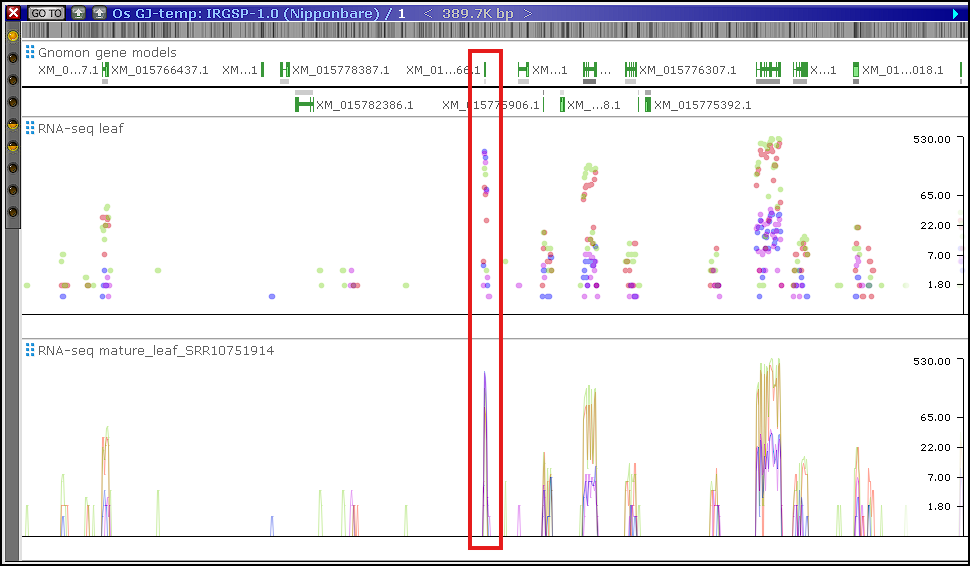
You can now adjust the line weight of the chart’s edge. This is especially helpful when Ladder segments are very short, as increasing the line weight makes them easier to see.
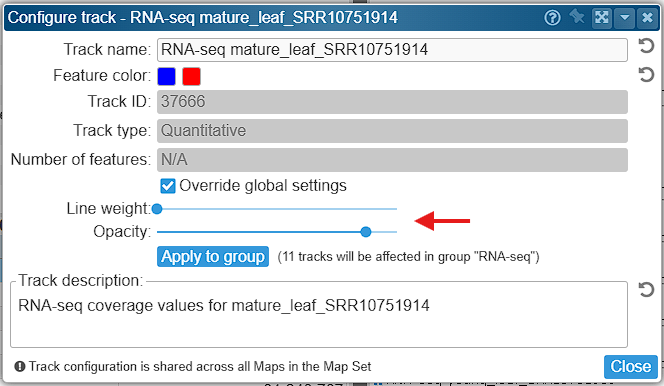
Color selection has also been improved. Each sub‑track can be assigned an individual RGB color, while opacity is controlled through a shared alpha setting that applies to all quantitative tracks simultaneously. You can still override the global default values for rendering quantitative tracks. Use the “Configure track options” context menu on a track and, if needed, check “Override global settings”. This way, you can define individual settings for specific tracks.
We’d be glad to hear whether these enhancements improve your workflow.